
Introducing the SeekStorm MCP server
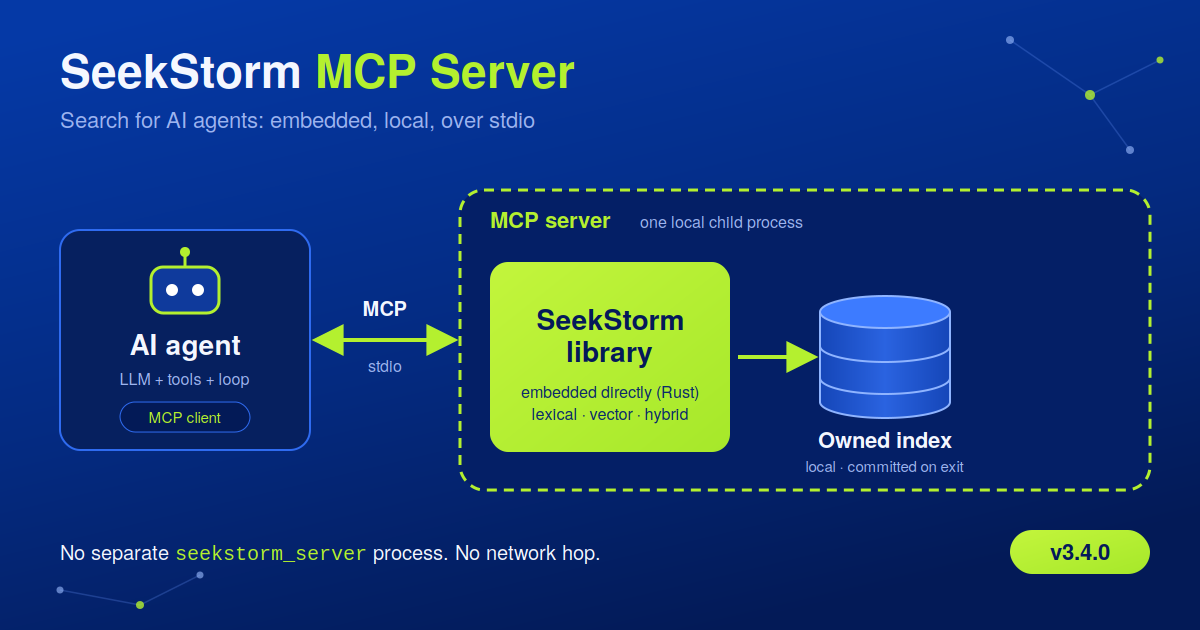
Connect AI applications to SeekStorm through the Model Context Protocol (MCP), with no separate seekstorm_server process required.
AI agents are only as good as the tools they can reach, and for most agents the most important tool is search. With SeekStorm v3.4.0 we’re shipping a new SeekStorm MCP server: a local, single-binary MCP server that embeds the SeekStorm search library directly, manages its own index, and talks to your AI client over stdio.
Point Claude, Cursor, or any other MCP-compatible client at it, and your agent gets fast lexical, vector, and hybrid search over your own documents in a few minutes.
What’s included
- 🔍 Lexical, vector & hybrid search: combine full-text (BM25) and semantic retrieval in one index.
- ⚙️ Advanced search features: filters, facets, sorting, and highlighting.
- 🗂️ Flexible indexing: configurable schemas and index settings, plus document indexing, updating, deletion, retrieval, and iteration.
- 📥 Multiple ingestion formats: JSON, NDJSON, and PDF indexing.
- ✅ Tested: unit tests, stdio integration tests, and MCP contract tests.
All of it is powered by SeekStorm’s high-performance search engine, written in Rust.
AI agents, RAG, and MCP: what they are and how they fit together
Three terms show up together constantly, and it’s easy to blur them. Here is what each one actually is.
What is an AI agent?
An AI agent is a large language model (LLM) wired up with tools and a loop. Instead of producing one reply and stopping, an agent decides which action to take next, calls a tool, reads the result, and decides again, repeating until the task is done.
- Reasons: plans the next step from the goal and what it has learned so far.
- Acts: calls a tool (search, a database, an API, code execution) to gather information or make a change.
- Observes & repeats: reads the tool’s output, updates its plan, and loops until the task is complete.
Two things set agents apart from a plain chatbot: they can take multiple steps without a person prompting each one, and every step is only as good as the tools available. A coding agent is only as good as its access to the repo and a shell. A research agent is only as good as its access to accurate, up-to-date information, which is where retrieval and search come in.
What is RAG (Retrieval-Augmented Generation)?
An LLM only knows what was in its training data, up to its cutoff date. It has no built-in access to your documents, your product catalog, or this morning’s news. RAG closes that gap. Before the model generates an answer, a retrieval step searches an external knowledge base for the passages most relevant to the question and hands them to the model as context.
- Query: the user or agent asks a question.
- Retrieve: a search engine finds the relevant passages.
- Augment: the passages are added to the model’s context.
- Generate: the model answers, grounded in that text.
The quality of a RAG system is capped by the quality of its retrieval step. If the search misses the relevant document, or buries it below irrelevant ones, the model never sees it, and no amount of prompting fixes that afterwards. RAG is fundamentally a search problem wearing an AI hat: it needs an engine that finds both the right keywords (lexical / BM25) and the right meaning (vector / semantic), fast enough to sit in an interactive loop.
What is MCP (Model Context Protocol)?
MCP is an open standard for connecting AI applications (chat clients, IDEs, coding agents) to external tools and data sources through one common protocol instead of a custom integration per pair.
Before MCP, giving an agent access to your search index, your database, and your ticketing system meant writing and maintaining a bespoke connector for each model and each tool. MCP defines a single client/server interface: any MCP-compatible client can talk to any MCP server without either side knowing the other’s internals in advance.
- MCP server: exposes a tool or data source, such as a search index, as a set of callable, discoverable capabilities.
- MCP client: lives inside the AI application or agent, discovers available servers, and calls their tools on the model’s behalf.
In short: the agent is the actor, RAG is one of the things it can do, and MCP is the wiring that lets it do so against real, external systems without one-off integration code.
How they connect
Put together, the three layer on top of each other:
- The agent is given a goal and decides, step by step, that it needs more information than it already has in its context window.
- MCP is how it reaches that information: it calls a search tool exposed by an MCP server, using the same protocol regardless of which search engine, database, or API sits behind it.
- RAG is what happens with the result: the retrieved passages are folded into the model’s context, so the next reasoning step and the final answer are grounded in real data instead of training-time memory.
An agent can run this cycle many times within a single task, often issuing several retrieval calls in parallel or in quick succession. That’s a very different load pattern from a person typing one query into a search box: it’s bursty, machine-speed, and unforgiving of slow or shallow retrieval.
Why SeekStorm as the retrieval layer
SeekStorm is built to be the retrieval layer underneath agents, RAG pipelines, and MCP, not retrofitted after the fact.
- Hybrid search, one index. Lexical (BM25) and vector search run natively over the same index. There is no separate vector database to keep in sync, and you get exact keyword matches and semantic matches combined.
- Real-time indexing. Documents are searchable the moment they’re indexed, so an agent’s retrieved context never lags behind the underlying data.
- Machine-speed, parallel-ready. Built in Rust for the request patterns agents generate: many queries, issued in parallel, with low and predictable latency.
- One portable index. The same index can back a human-facing search box and serve as the retrieval tool an agent calls through MCP.
How the SeekStorm MCP server works
The server runs as a child process over MCP stdio, the same way most local MCP servers work today. It embeds SeekStorm directly and owns its local index: single binary, zero network hop, no seekstorm_server process needed.
That makes it a natural fit for agentic search over local content: a coding agent indexing a repository, or a RAG pipeline indexing a knowledge base on the same machine.
Note: the MCP server currently implements embedded mode only. It does not yet connect to a remote SeekStorm server.
Quickstart
Build from the workspace root:
1
cargo build --release -p seekstorm_mcp_server
Add the server to your MCP client configuration, replacing the executable path with the location of your built binary:
1
2
3
4
5
6
7
8
9
10
{
  "mcpServers": {
    "seekstorm": {
      "command": "C:/path/to/seekstorm_mcp_server.exe",
      "env": {
        "SEEKSTORM_INDEX_PATH": "C:/Users/me/seekstorm-index"
      }
    }
  }
}
The server opens the index at SEEKSTORM_INDEX_PATH if it exists. Otherwise it creates one there with a small default schema containing title, body, and path text fields. The index is committed when the MCP process exits.
During development you can also launch it directly from the workspace:
1
2
$env:SEEKSTORM_INDEX_PATH = "$PWD/seekstorm_index"
cargo run -p seekstorm_mcp_server
MCP clients speak the stdio protocol, so the server must never write regular output to stdout.
Try it without an agent
An MCP client such as MCP Probe lets you talk to the server directly:
1
2
$env:SEEKSTORM_INDEX_PATH="seekstorm_index";
.\mcp-probe debug --stdio "seekstorm_mcp_server.exe"
Custom schemas and index settings
To create an index with a different schema or vector settings at startup, set SEEKSTORM_INDEX_CONFIG to a JSON file containing a SeekStorm CreateIndexRequest:
1
2
3
4
5
6
7
8
9
10
{
  "index_name": "project_docs",
  "schema": [
    { "field": "title", "field_type": "Text", "store": true, "index_lexical": true, "boost": 5 },
    { "field": "body", "field_type": "Text", "store": true, "index_lexical": true, "longest": true },
    { "field": "url", "field_type": "Text", "store": true, "index_lexical": false }
  ],
  "similarity": "Bm25f",
  "tokenizer": "UnicodeAlphanumericFolded"
}
The request uses the same schema and index-setting types as the SeekStorm library and REST client, including synonyms, spelling correction, query completion, vector inference, and clustering. For an already-running process, use the create_index tool with an index_path and a config object, or open_index to switch to an existing local index. Switching indexes commits the active one first.
The tools your agent gets
| Area | Tools |
|---|---|
| Index management | create_index, open_index, get_index_info, clear_index, commit |
| Indexing | index_document, index_documents, update_document, update_documents |
| Retrieval | search, get_document, document_iterator |
| Deletion | delete_document, delete_documents, delete_documents_by_query |
| Ingestion & files | ingest_json, index_pdf_file, get_file |
Documents are arbitrary JSON objects whose fields must match the active index schema. ingest_json streams JSON arrays, NDJSON, and concatenated JSON documents. index_pdf_file extracts text from a local PDF (it requires an available Pdfium library), and get_file returns the associated file bytes as base64 text.
delete_documents_by_query uses length and offset to bound and page through matching documents before deletion, so it’s good practice to search first and verify the intended matches.
Searching: lexical, vector, hybrid
The search tool accepts a query, length, offset, and mode (Lexical, Vector, or Hybrid). It also supports SeekStorm query types and rewriting, real-time search, field selection, facet filters and facets, sorting, highlighting, ANN settings, and similarity thresholds.
A lexical search:
1
2
3
4
5
6
7
{
  "query": "indexing pipeline",
  "mode": "Lexical",
  "length": 5,
  "offset": 0,
  "field_filter": ["title", "body"]
}
A vector search against a 3-dimensional vector index:
1
2
3
4
5
6
{
  "query": "related documents",
  "mode": "Vector",
  "query_vector": [0.12, -0.03, 0.88],
  "length": 5
}
For vector or hybrid search, provide query_vector (floats) or query_vector_i8 (signed 8-bit values), unless the index is configured with an internal inference model. Explicit vectors must match the index dimensions, and vector search needs vector-indexed fields in the schema. Hybrid search combines lexical fields and vectors. ann_mode accepts SeekStorm’s serialized AnnMode, for example "All" or { "Nprobe": 8 }.
Facet definitions, filters, sort definitions, highlights, query rewriting, and enum settings are passed in their SeekStorm serialized JSON forms. Schema and index settings are fixed when an index is created; changing them means creating a new index and reindexing.
Try it with your own agent
Run the MCP server with a local index for agentic search over your own docs or repo, and your agent gets real, grounded retrieval in minutes. Run the test suite from the workspace root with:
1
cargo test -p seekstorm_mcp_server
Explore the release: SeekStorm v3.4.0 on GitHub
Learn more: AI agents, RAG, and MCP explained
#SeekStorm #MCP #ModelContextProtocol #Rust #AI #VectorSearch #OpenSource